-
Shop
- Advanced Technologies
- AI Skills
- AI Skills Mastery 2026 Collection
- Bathroom
- Best-Sellers
- Car Accessories
- Confidence
- Dating & Social Skills
- Digital Resources
- AI & Technology
- Beauty
- Budgeting & Saving
- Car Buying & Ownership
- Electronics & Technology
- Entrepreneurship & Business Growth
- Financial Independence
- Financial Mindset & Psychology
- Goal Setting
- Home Styling & Organization
- Kitchen & Recipes
- Leadership
- Mindset
- Online Business
- Parenting & Child Development
- Personal Style & Fashion
- Pet Lifestyle & Wellness
- Positive Thinking
- Sleep Improvement
- Smart Life with AI
- Stress Management & Relaxation
- Wellness
- Yoga & Mind-Body Practices
- Education & Learning
- Family & Parenting
- Fashion
- Financial Education
- Furniture
- Gadgets
- Health & Beauty
- Health & Wellness
- Home & Garden
- Home Electronics
- Kids & Babies
- Kitchen
- Kitchen Best-Sellers
- Lighting
- Luxury Brands Collection
- Patio, Lawn & Garden
- Personal Growth
- Pet Care
- Pet Supplies
- Pets
- Sport & Outdoors
- Stress Relief & Relaxation
- Travel
- Travel & Adventure
- Wealth
- Popular
- Best deals
6MP Dual-Lens Wireless NVR Kit: Wider Coverage, Less Wiring
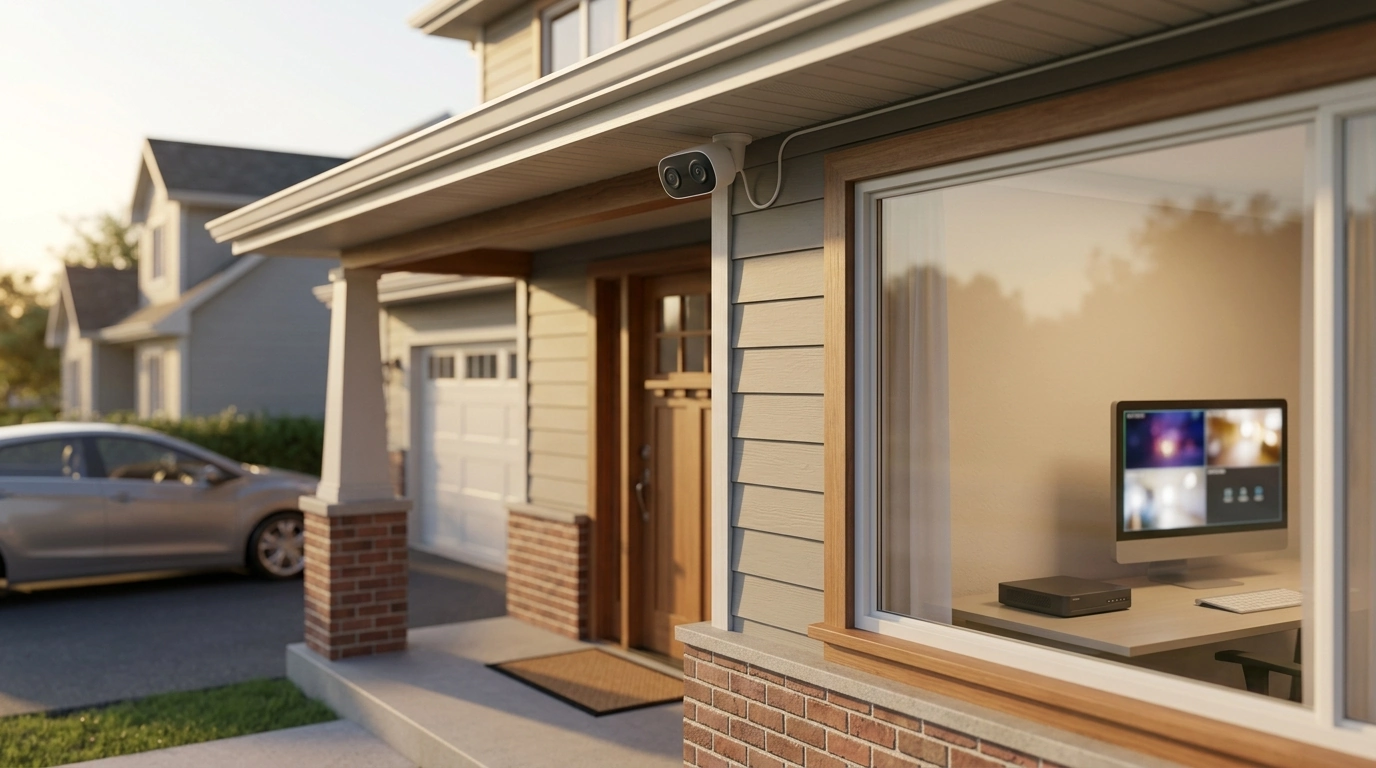
Clear Coverage Without Complex Wiring: How a 6MP Dual‑Lens Wireless NVR Kit Fits Modern Security Needs
A dual‑lens wireless camera system paired with an 8‑channel NVR can simplify whole‑property monitoring while keeping video detail and audio capture in one place. Instead of stitching together different apps, microSD cards, and camera views, an NVR kit centralizes live viewing and playback—while dual lenses help expand coverage without doubling the number of camera mounts.
What a dual‑lens wireless NVR kit is designed to solve
Traditional camera setups often force a tradeoff: install more cameras to cover blind spots, or accept gaps in visibility. A dual‑lens camera reduces that dilemma by combining two viewpoints in one housing, which can help cover both detail and context at the same location.
- Covers wider areas with fewer camera placements by combining two viewpoints in one housing
- Reduces long cable runs compared with traditional wired camera installs while keeping centralized recording
- Keeps footage organized on an NVR for easier review than scattered microSD‑only cameras
- Supports multi‑camera growth over time with an 8‑channel recorder for additional viewpoints
Key components in the 6MP dual‑lens + 8CH NVR audio kit
Understanding how each piece contributes helps avoid common setup frustrations—especially around power planning and signal stability.
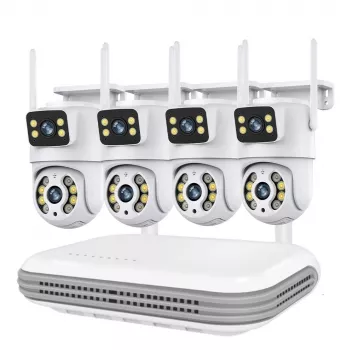
- Dual‑lens wireless cameras: Two lenses can capture a broader scene or complementary perspectives from the same mount point.
- 8‑channel NVR: The control center for pairing cameras, recording, and searching playback by channel and time.
- Audio capability: Useful for context—matching motion to voices, vehicle sounds, or activity near entry points.
- Power accessories: Even when video is wireless, the cameras and NVR typically still need dependable power.
Video clarity and coverage: getting the most from 6MP and dual lenses
Higher resolution matters most where identification is needed—front entries, package drop zones, and driveways. Dual lenses work best when each lens has a job: one for close detail, the other for the bigger picture.
- Use higher‑resolution capture for identifying details like faces at entry points and package drop zones
- Aim one lens toward high‑traffic paths and the other toward wider context (driveway + street edge, for example)
- Mount to avoid direct glare from sunrise/sunset and minimize bright backlighting at doors
- Prefer overlapping coverage for critical zones (front door, garage, side gate) to reduce blind spots
Placement ideas for dual‑lens cameras
| Location | Lens A focus | Lens B focus | Common mistakes to avoid |
|---|---|---|---|
| Front door / porch | Doorstep and lock area | Walkway approach | Mounting too high; missing faces and packages |
| Driveway | Vehicle area / garage door | Street edge / sidewalk | Pointing into headlights; excessive night glare |
| Backyard | Patio doors and windows | Fence line / gate | Mounting under eaves with heavy shadowing |
| Side passage | Gate and latch | Long corridor view | Not using overlapping angles for narrow paths |
Wireless performance: what to expect and how to improve stability
“Wireless” typically refers to video transmission, not power. Real‑world reliability depends on where the NVR sits, what materials are between it and the cameras, and how much interference exists nearby.
- Wireless usually refers to video transmission; stable power and a strong signal path still matter
- Place the NVR where cameras have the fewest walls between them; avoid metal enclosures
- Separate the NVR from sources of interference when possible (large appliances, dense wiring closets)
- Test each camera position before final mounting to confirm steady live view and recording
For a practical overview of wireless interference and troubleshooting basics, the FCC’s consumer resources are a helpful starting point: FCC Consumer Guide.
Audio recording: practical uses and basic considerations
Audio can turn a motion clip into a clearer story—confirming whether a late‑night alert was a delivery, a conversation at the door, or a vehicle pulling into the driveway.
- Adds context to motion events (voices, vehicle sounds, delivery confirmations)
- Helps verify alarms and reduces unnecessary responses to minor motion triggers
- Check local laws and property rules for recording audio; post notices when appropriate
- Position cameras to reduce constant noise sources (busy roads, HVAC vents) that can mask useful audio
8‑channel NVR advantages for homes and small businesses
An 8‑channel recorder is a practical middle ground: enough capacity for full perimeter coverage on many properties, while still leaving room to grow.
- Consolidates playback so incidents can be reviewed by channel, timeline, and event type
- Leaves room to expand coverage later (add cameras for side gates, stock rooms, or entrances)
- Improves incident retention when paired with appropriate storage capacity and recording schedule
- Enables consistent settings across cameras for motion zones and alert behaviors
Setup roadmap: from unboxing to reliable recording
Care, storage, and long‑term reliability
For everyday security hygiene—like protecting accounts and reducing device risk—NIST’s small business and home guidance is a solid reference: NIST Cybersecurity for Home and Small Business Users.
Product options available now
6MP Wireless CCTV Camera System with Dual-Lens and 8CH NVR Audio Kit
The Smart Bundle to Avoid Travel Scams: 3-in-1 Digital Guide, Checklist & AI Tools
Easy Online Store Setup Bundle: 4-in-1 Guide to Social Store, Google Console, and More
FAQ
Does a wireless NVR camera system still need cables?
Yes—most “wireless” NVR systems send video wirelessly, but the cameras and the NVR typically still require power. The big advantage is reducing long video cable runs, so planning nearby outlets or safe power routing still matters.
How many cameras can be added to an 8-channel NVR?
An 8‑channel NVR supports up to eight camera channels total. If the kit includes fewer cameras, you can usually add compatible cameras to fill the remaining channels, as long as they pair properly with the recorder.
Is audio recording legal for home security cameras?
Laws and consent requirements vary by location, so it’s important to check local rules before recording audio. When required, clear notice or consent can help keep recording practices compliant.













Leave a comment